DashboardSign In

Build the form your restaurant actually needs

A visual form builder for incident reports, checklists, and anything else paper used to handle, with approvals that route themselves.
How it works

  1. Build

    Drag sections and fields onto the canvas: text, numbers, dates, checkboxes, signatures, file uploads, and more.
  2. Preview

    See exactly what an employee will see before you publish.
  3. Publish and assign

    Send it to specific employees, or let employees start it themselves.
  4. Route for approval

    Submissions move through the chain you define, then they're done.

What it looks like

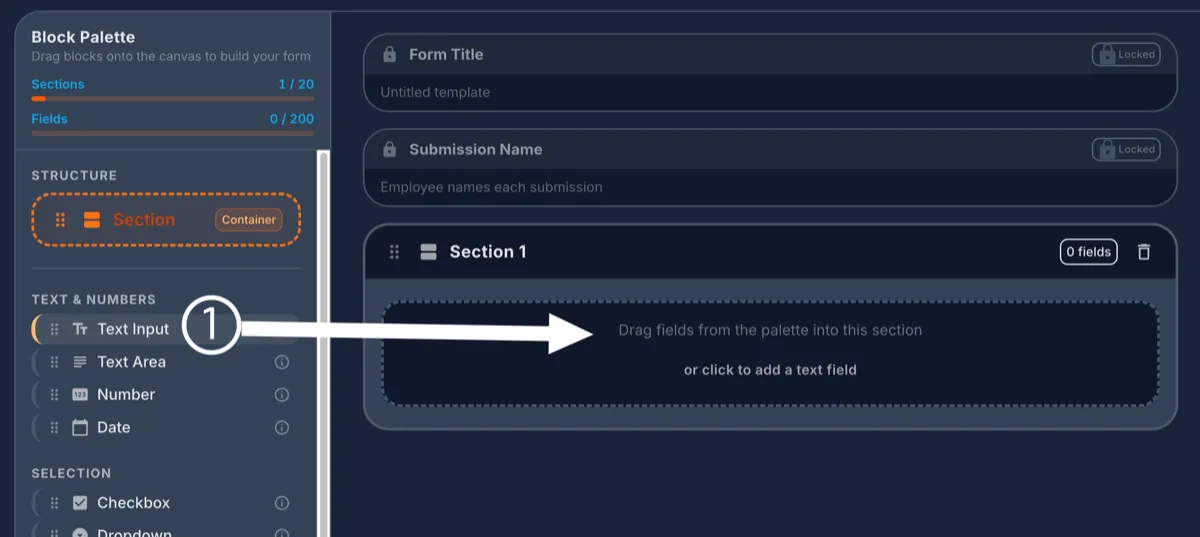
The form builder's Block Palette showing Structure and field type categories, with an arrow pointing from the Text Input field to an empty section on the canvas
Drag any field type from the palette straight into a section to add it to your form.

What you can configure

Repeatable sections

Let an employee add multiple instances of a section, useful for something like multiple expense line items.

Manager-only sections

Restrict a section so only managers can fill it in, and hide it from the employee entirely if you choose.

Multi-step approval chains

Route a submission through managers, admins, or a specific job title, in the order you define.

File uploads and signatures

Attach a photo, a PDF, or a signature field directly on the form.

Link a document in

Embed a link to a document you've already uploaded, right inside a form.

Draft, publish, archive

Work on a form freely as a draft, publish it when it's ready, and archive it later without losing the history.

Every submission as a PDF

Download any completed submission as a PDF, ready to print or file away.

A manager can finish it for someone

When someone can't complete their own submission, a manager can fill it out and complete it on their behalf.

Learn more

Build your first form today

Every location gets a 30-day free trial, no card required.